init debian


spam protection

Postfix Spam Protection Improvements

Overview

Implemented multi-layer spam protection for mail server at mail.keisanki.net.

1. Fixed SpamAssassin Milter Socket

Problem: SpamAssassin milter socket path was incorrect, causing spam filtering to fail.

Solution: Created proper systemd service and fixed socket path.

File: /etc/systemd/system/spamass-milter.service

Tags

ssh client

~/.ssh/config

Host ALIAS
 HostName HOST.DOM.TLD
 User USER
 
# client_loop: send disconnect: Broken pipe # NAT/Firewall Termination
Host *
 TCPKeepAlive yes
 ServerAliveInterval 30
 ServerAliveCountMax 5

init

  1. ssh-keygen -t ed25519
  2. cat ~/.ssh/id_ed25519.pub
  3. ssh-copy-id -i $HOME/.ssh/id_ed25519.pub root@bubu
  4. echo "id_ed25519 ...
Tags

Incus Resource Limits Guide

This document explains how to prevent Incus containers from consuming all host resources by applying CPU, memory and process limits using profiles.

Containers share the host kernel. Without limits, any container process (for example ffmpeg in PeerTube) can use all available CPU cores and memory.

Using Incus profiles allows applying resource policies to many containers at once.


Inspect Current Container Limits

Check a container configuration:

Tags

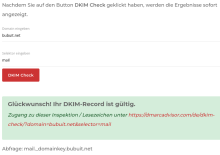
opendkim

  1. ai opendkim opendkim-tools
  2. mkdir /var/spool/postfix/opendkim/
  3. chown opendkim /var/spool/postfix/opendkim
  4. usermod -aG opendkim postfix
  5. YEAR=$(date +'%Y')
  6. DOMTLD=DOM.TLD
  7. mkdir -p /etc/opendkim/keys/$DOMTLD
  8. cd /etc/opendkim/keys/$DOMTLD
  9. opendkim-genkey -s $YEAR -d $DOMTLD
  10. chown opendkim:opendkim *.private
  11. vim /etc/opendkim.conf

vim /etc/default/opendkim

RUNDIR=/var/spool/postfix/ru

Tags

Incus Networking on Routed /32 Hosts (Hetzner-style)

This document describes the correct and supported networking models for running Incus on hosts with a routed public IPv4 /32, such as Hetzner ARM and similar cloud servers. It also documents common pitfalls, misleading error messages, and the rationale behind the recommended setup.


1. Host Characteristics

Typical properties of these systems:

Tags

AH00558 Apache Warning

Problem

Beim Start von Apache erscheint:

AH00558: apache2: Could not reliably determine the server's fully qualified domain name, using 127.0.0.1.
Set the 'ServerName' directive globally to suppress this message

Ursache

Apache hat keinen global gesetzten ServerName.

Tags

Slimming Guide

This document describes how to safely reduce the size of an LXC container before migrating it to Incus or copying it to a remote server. It provides commands to identify large directories, remove unnecessary data, and clean up legacy components.


1. Identify Large Directories

Run these commands inside the container:

du -xhd1 /
du -xhd1 /var
du -xhd1 /var/lib
du -xhd1 /usr

Use ncdu for an interactive view:

Incus: Disable AppArmor

This page documents how to disable AppArmor confinement for existing and new Incus containers in the raid1 project. This eliminates AppArmor DENIED spam in kernel logs and journald.


Overview

Incus generates per-container AppArmor profiles. Many containers produce constant AppArmor DENIED messages (e.g. systemd-logind mount attempts). To stop this, containers can be switched to the unconfined AppArmor profile using:

Tags

autopostgresqlbackup

  1. ai autopostgresqlbackup
  2. dpkg -L autopostgresqlbackup
  3. mkdir /var/backups/autopostgresqlbackup
  4. vim /etc/default/autopostgresqlbackup
  5. /usr/sbin/autopostgresqlbackup
  6. l /var/backups/autopostgresqlbackup/*/*

PeerTube

  1. https://docs.joinpeertube.org/maintain/migration 
  2. vim $(which autopostgresqlbackup) +361 #367
    • su $SU_USERNAME -l -c "pg_dump -Fc $PGHOST $OPT $db -f $2"
    • pg_dump -Fc --username=$USERNAME $PGHOST $OPT $db -f $2

PeerTube Migration btrfs Incus

Diese Dokumentation beschreibt das final empfohlene Setup für die PeerTube-Instanz auf at1 in Verbindung mit:

  • einem btrfs‑RAID1 unter /mnt/raid1,
  • klar getrennten btrfs‑Subvolumes,
  • einem Incus‑Container (peertube oder peertube4),
  • sauberem Host→Container‑Mounting via Incus‑Disk‑Device,
  • korrekt eingerichtetem User‑Namespace‑Mapping.

Das Ziel ist ein robustes, snapshot‑fähiges, sauber getrenntes System, das Migrationen und Backups extrem erleichtert.

Parallel File Transfer

This documentation provides optimized and parallelized methods for transferring Peertube media data from an LXC container to a remote server. It focuses on speed, reliability, and efficient handling of large file sets. All examples assume the source directory:

/var/lib/lxc/CTNAME/rootfs/var/www/peertube/storage/

and the destination:

Tags

Incus Container Image

Diese Doku beschreibt, wie ein bestehender Incus-Container CTNAME in ein wiederverwendbares Image umgewandelt und auf einen anderen Server übertragen wird. Aus diesem Image kann auf dem Zielsystem wieder ein Container erstellt werden.

Es werden zwei Varianten gezeigt:

Tags

incus debug

incus start listmonk Error:   
Failed start validation for device "net0": MAC address "00:16:3e:7f:0d:73" already defined on another NIC

incus config device unset listmonk net0 hwaddr

incus shell web-test     
Error while executing alias expansion: incus exec web-test -- su -l 
Error: Instance not found

Tags

incus_remote_copy.sh

#!/bin/bash
# Script Version: 02
# Description: Automate migration of a single LXC container to Incus and push it to remote project

# Set variables
# ========
LXCHOSTNAME="$1"
REMOTE_NAME="at1"
TARGET_PROJECT="raid1"
DEBUG=1

# Safety checks
# ========
if [ -z "$LXCHOSTNAME" ]; then
  echo "[ERROR] Usage: $0 <LXCHOSTNAME>"
  exit 1
fi

# Functions
# ========
stop_lxc_container() {
  echo "[DEBUG] Stopping LXC container $LXCHOSTNAME"
  if lxc-info -n "$LXCHOSTNAME" &>/dev/null; then
    lxc-stop -n "$LXCHOSTNAME" 2>/dev/null || true
  else
Tags

spamd bind dnsmasq resolveconf

Die Kombination aus BIND9, dnsmasq und SpamAssassin so konfiguriert wird, dass:

Incus: Remote-Server mit Trust-Token

Diese Dokumentation beschreibt, wie ein lokaler Incus‑Client mit einem entfernten Incus‑Server per Trust‑Token verknüpft wird.

Beispielszenario:

Tags

incus_remote_rsync.sh

#!/bin/bash
# Script Version: 04
# Description: Incus migration helper (DEV state)
# ======= USAGE =======
# Usage: ./incus_remote_rsync.sh <container-name> <target-host> [project] [--snapshot] [--no-compress]
# Examples:
#   ./incus_remote_rsync.sh zammad 80.109.18.113 raid1 --snapshot
#   ./incus_remote_rsync.sh zammad 80.109.18.113
#   ./incus_remote_rsync.sh peertube 80.109.18.113 raid1 --no-compress
# ======= ARGS & DEFAULTS =======
if [ -z "$1" ] || [ -z "$2" ]; then
 echo "Usage: $0 <container-name> <target-host> [project
Tags

LXC2Incus

A comprehensive guide for system administrators, self‑hosters, and advanced Linux users who want to migrate from classic LXC to Incus. The process ensures reliable container management, persistent networking, and smooth integration with storage and firewall systems.

Tags

mailserver D13 Trixie Debug

disable remove
ap pyzor
grep -i pyzor /etc/spamassassin/*.cf
/etc/spamassassin/v310.pre:loadplugin Mail::SpamAssassin::Plugin::Pyzor


Tags

Virtueller Mailserver

Diese Dokumentation beschreibt den vollständigen Aufbau eines virtuellen Mailservers unter Debian 13 (Trixie) mit Postfix, Dovecot, LMTP‑Zustellung, TLS‑Absicherung, Alias‑Management und einem klaren Flat‑Mailstore‑Design. Der Fokus liegt auf Stabilität, Übersichtlichkeit und Erweiterbarkeit.


🔧 1. Pakete installieren (Postfix + Dovecot)

Für einen vollständigen virtuellen Mailserver werden folgende Pakete benötigt:

Tags

postfix main.cf

compatibility_level = 3.6
smtpd_banner = $myhostname ESMTP $mail_name (Debian/GNU)
command_directory = /usr/sbin
daemon_directory = /usr/lib/postfix/sbin
data_directory = /var/lib/postfix
sendmail_path = /usr/sbin/postfix
newaliases_path = /usr/bin/newaliases
mailq_path = /usr/bin/mailq

mail_owner = postfix
myhostname = mail.bubuit.net
mydomain = bubuit.net
myorigin = $mydomain
mydestination = $myhostname, localhost.$mydomain, localhost, $mydomain
setgid_group = postdrop
inet_interfaces = all
inet_protocols = ipv4 
unknown_local_recipient_reject_code = 55
Tags

15-mailboxes.conf

 # These mailboxes are widely used and could perhaps be created automatically:
namespace inbox {
  mailbox Drafts {
    auto = subscribe
    special_use = \Drafts
  }
  mailbox Junk {
    special_use = \Junk
    auto = subscribe
  }
  mailbox Templates {
    auto = subscribe
  }
  mailbox Trash {
    auto = subscribe
    special_use = \Trash
  }
  mailbox Sent {
    auto = subscribe
    special_use = \Sent
  }
  mailbox Important {
    auto = subscribe
    special_use = \Important 
  }
  mailbox Archive {
    auto = subscribe
    special_use = \Archive
  }
Tags

spamassassin

  1. ai spamassassin spamd sa-compile spamass-milter re2c pyzor libmail-spamassassin-perl libarchive-zip-perl libidn2-dev libgeo-ip-perl libgeoip-dev perl-doc cpanminus libnet-libidn2-perl libencode-detect-perl libnet-patricia-perl libio-compress-perl libmail-spf-perl libio-socket-inet6-perl libdbi-perl libdbd-sqlite3-perl libwww-perl liblwp-protocol-https-perl libbsd-resource-perl libemail-address-xs-perl libmail-dmarc-perl libdevel-cycle-perl libtext-diff-perl libnet-libidn-perl libmaxmind-db-reader-perl libmaxmind-db-reader-xs-perl libdigest-sha-perl
  2. usermod -a -G spamass-milter

milter_mail_macros

📨 Postfix & SpamAss-Milter Integration Guide

Overview

A complete guide to integrating Postfix with SpamAss-Milter on Debian for effective spam filtering. It covers macro configuration, testing, troubleshooting, and best practices for maintaining clean, reliable mail logs.

Tags

Btrfs – Optimized Configuration & Maintenance Guide

A refined, consistent, and practice-focused guide for running Btrfs efficiently on your at1 server. The structure emphasizes clarity, reliability, and long-term maintainability.


1. Overview

Btrfs is a modern copy-on-write filesystem designed for environments where integrity, snapshots, and flexibility are essential. It excels with:

Tags

Smartmontools

Smartmontools – Comprehensive Monitoring Guide

Overview

Smartmontools is an essential tool for monitoring SSDs and HDDs in modern server environments. It identifies early signs of hardware degradation, provides detailed diagnostics, and integrates seamlessly into automated maintenance workflows. This guide delivers a production‑ready configuration, clear threshold recommendations, structured troubleshooting, operational best practices, and an automated daily health‑check script for the server at1.

Tags

SMB/CIFS

This guide explains how to configure a Samba share on Debian 13 (Trixie) and connect to it from a Windows 10 laptop in the local LAN (192.168.0.0/24). It also covers integration with FireHOL firewall rules and using the share with BorgBackup.

Tags

Btrfs RAID1 mit Snapshots

Voraussetzungen

  • Zwei leere Festplatten (z. B. /dev/sda und /dev/sdb)
  • Root-Zugriff
  • Debian 12 oder neuer

1. Vorbereitung: Platten löschen und partitionieren

wipefs -a /dev/sda
wipefs -a /dev/sdb

parted -s /dev/sda mklabel gpt
parted -s /dev/sda mkpart primary 0% 100%

parted -s /dev/sdb mklabel gpt
parted -s /dev/sdb mkpart primary 0% 100%

2.

Tags

bind9

  1. ai bind9 geoip-database
  2. vim /etc/bind/named.conf.options
  3. vim /etc/bind/named.conf.local
  4. mkdir /var/log/named/
  5. chown -R bind:bind /var/log/named/
  6. sc-restart named.service
  7. t /var/log/named/*

🛍 DNS-Referenz-Setup (ns1.dynproxy.net – 23.88.113.138)

🔐 Rollenverteilung

  • Autoritativer DNS-Server für:
    • dynproxy.net
    • bubuit.net
  • Lokaler Resolver für:
    • 127.0.0.1

📜 Wichti

Tags

bind_add_slave_zone_ns3.sh

#!/bin/zsh
# Version 01
# Script to add a new slave zone to /etc/bind/named.conf.local on ns3.dynproxy.net
# Script Name: bind_add_slave_zone_ns3.sh

# Variables
NAMED_CONF="/etc/bind/named.conf.local"
CACHE_DIR="/var/cache/bind"

# Check if a domain name argument is provided
if [ -z "$1" ]; then
	echo "Usage: $0 <domain.tld>"
	exit 1
fi

DOMAIN=$1
ZONE_FILE="$CACHE_DIR/$DOMAIN.db"

# Check if the zone configuration already exists
if grep -q "zone \"$DOMAIN\"" $NAMED_CONF; then
	echo "Zone $DOMAIN already exists in $NAMED_CONF.
Tags

bind_add_slave_zone.sh ns2

#!/bin/zsh
# Version 01
# Script to add a new slave zone to /etc/bind/named.conf.local on ns2.dynproxy.net
# Script Name: bind_add_slave_zone.sh

# Variables
NAMED_CONF="/etc/bind/named.conf.local"
CACHE_DIR="/var/cache/bind"

# Check if a domain name argument is provided
if [ -z "$1" ]; then
	echo "Usage: $0 <domain.tld>"
	exit 1
fi

DOMAIN=$1
ZONE_FILE="$CACHE_DIR/db.$DOMAIN"

# Check if the zone configuration already exists
if grep -q "zone \"$DOMAIN\"" $NAMED_CONF; then
	echo "Zone $DOMAIN already exists in $NAMED_CONF.
Tags

bind_checkzone.sh

#!/bin/zsh
# Version 29

# Variables
NAMED_CONF_LOCAL="/etc/bind/named.conf.local"
CHECKZONE_CMD="named-checkzone"

# Function to parse zones and file paths
parse_zones() {
    awk '/zone/ {gsub(/[\";]/, ""); zone=$2} /file/ {gsub(/[\";]/, ""); file=$2; print file}' "$NAMED_CONF_LOCAL"
}

# Main function
main() {
    echo "Parsing $NAMED_CONF_LOCAL for zone files"

    parse_zones | while read -r ZONE_FILE; do
        if [ -z "$ZONE_FILE" ]; then
            echo "No file specified for zone"
            continue
        fi

        if [ -f "$ZONE_FILE" ]; 
Tags

Resource Control Guide for Windsurf

Dieses Dokument liefert eine vollständig optimierte Anleitung, um Windsurf‑Remote‑Sessions auf Debian‑basierten VPS‑Systemen stabil und ressourcenschonend zu betreiben. Es zeigt, wie ripgrep (rg) gezielt eingegrenzt, übermäßige Dateisystem‑Scans verhindert und systemweite Speicherlimits gesetzt werden. Der Text wurde sprachlich geglättet, strukturell verfeinert und lesefreundlich gestaltet.

Tags

nginx jitsi proxy

server {
    server_name jitsi.DOM.TLD;
    listen 80;
    ssl_session_cache shared:SSL:10m;  # about 40000 sessions
    add_header    Strict-Transport-Security "max-age=7200";

firehol

  1. ai firehol firehol-tools ulogd2 conntrack
  2. sc-status firehol
  3. sc-start firehol
  4. sc-restart firehol

vim /etc/default/firehol

START_FIREHOL=YES

vim /etc/firehol/firehol-defaults.conf +461

  • t /var/log/ulog/syslogemu.log
# IPTABLES PACKETS LOGGING
# LOG mode for iptables
# Default: LOG
# Possible Values: LOG, ULOG, NFLOG
# LOG = syslog
# We recommend to install ulogd and use NFLOG.
FIREHOL_LOG_MODE="NFLOG"

Tags

fail2ban

  1. ai fail2ban
  2. fail2ban-client status
  3. fail2ban-client status postfix
  4. fail2ban-client set postfix unbanip IP
  5. fail2ban-regex /var/log/mail.warn /etc/fail2ban/filter.d/postfix.conf
  6. fail2ban-regex systemd-journal "postfix[mode=aggressive]"
  7. vim /etc/fail2ban/jail.local
  8. fail2ban-client reload postfix
  9. service fail2ban restart
  10. fail2ban-customs
  11. f2b_status.sh

show my public ip

curl -4

/etc/fail2ban/jail.d/mail.conf

vim /etc/fail2ban/jail.d/mail.conf

[postfix]
enabled = true
port    = smtp,465,submission
filter    = postfix[mode=aggressive]
logpath = /var/log/mail.log
maxretry    = 4

[dovecot]
enabled		= true
filter		= dovecot[mode=aggressive]

# CUSTOM
[spamassassin]
enabled     = true
filter      = spamassassin
logpath     = /var/log/mail.info
maxretry    = 1
Tags

jail.local

vim /etc/fail2ban/jail.local

[Definition]
allowipv6 = auto

[DEFAULT]
ignoreip    = 10.0.3.0/24
bantime     = 1d
findtime    = 2d
maxretry    = 2

bantime.increment = true
bantime.factor = 2

[pam-generic]
enabled   = true
backend   = systemd
journalmatch = _SYSTEMD_UNIT=sshd.service
              + _SYSTEMD_UNIT=login.service
              + _SYSTEMD_UNIT=systemd-user-sessions.service

[recidive]
ignoreip	= YOUR-LOCAL-CLIENT-IP-RANGE.0.0/16 
enabled		= true
f
Tags

/etc/fail2ban/jail.d/nginx.conf

vim /etc/fail2ban/jail.d/nginx.conf

[nginx-bad-request]
enabled     = true
filter      = nginx-bad-request

[nginx-botsearch]
enabled     = true
filter      = nginx-botsearch

[nginx-404]
enabled     = true
port        = http,https
filter      = nginx-404
logpath     = /var/log/nginx/access.log
maxretry    = 300

[nginx-http-auth]
enabled     = true
port        = http,https
filter      = nginx-http-auth
logpath     = /var/log/nginx/error.log

[nginx-botsearch]
enabled     = true
port        = http,https
filter      = nginx-botse
Tags

fail2ban customs

vim /etc/fail2ban/filter.d/nginx-probe-wp.conf

[Definition]
# Aggressive WP-probe blocker for non-WP hosts (NO 'feed' matches).
# Covers:
# - double slashes (//)
# - 0–3 arbitrary prefixes: blog/, web/, 2020/, wordpress/, wp/, shop/, ...
# - wp-admin[/setup-config.php|/install.php], wp-login.php, xmlrpc.php[?rsd]
# - trees: wp-includes/**, wp-content/**
# - leak/info files: wp-config.php, readme.html, license.txt, wlwmanifest.xml, ID3/license.txt

failregex = ^<HOST> - - \[.*?\] "\w+\s+/{1,2}(?:[A-Za-z0-9._-]+/){0,3}(?:wp-admin(?:/(?:setup-co
Tags

postfix debug

Warning: Database is older than source file /etc/aliases

newaliases 
postfix reload

DNS Standards

According to DNS standards (RFC 2181, Section 10.3), MX records should reference a domain name, not an IP address. 
The domain name should then resolve to an IP address via an A or AAAA record.

Tags

Jitsi in Incus: Sysctl

Environment Overview

This setup runs with:

  • Host: Debian Trixie
  • Incus Container (Jitsi): Debian 12 (Bookworm)

These differences matter because sysctl capabilities depend on the host kernel version and Incus' container isolation model.

Tags

FireHOL & Conntrack

FireHOL is a powerful and intuitive firewall manager for Linux systems. It is widely used on servers, routers, gateways, virtualization hosts, and container environments where clear, stateful, and auditable firewall rules are essential. FireHOL automatically generates iptables/nftables rules and relies heavily on the Linux conntrack subsystem to enable stateful packet inspection and context‑aware filtering.

Tags

Backup and Restore of Manually Installed APT Packages

Backup and Restore of Manually Installed APT Packages

This documentation describes how to save and restore manually installed APT packages on a Debian-based system.
It uses the apt-mark showmanual command to generate a clean list of user-installed packages, which can be used to restore or clone systems.

Overview

A list of manually installed packages is created and stored at:

/etc/apt/packages.list

This file is overwritten each time the backup tool is executed.

DNSBL / dnsbl-ipset

Diese Seite dokumentiert die eigentliche dnsbl-ipset-Engine (FireHOL dnsbl-ipset.sh), die in Echtzeit IP-Adressen gegen verschiedene DNS-Blocklisten prüft und in ein ipset schreibt.

== Ziel

  • Verdächtige Verbindungen aus dem Firewall-Log (ulogd) in Echtzeit gegen DNSBLs prüfen
  • Treffer automatisiert in ein ipset schreiben
  • iptables-Regeln verwenden dieses ipset, um IPs temporär zu blocken

== Komponenten

Tags

dnsbl-ipset

  1. https://github.com/firehol/firehol/wiki/dnsbl-ipset.sh
  2. /usr/share/doc/firehol-tools/examples/contrib/dnsbl-ipset.sh

/etc/firehol/firehol.conf

# dnsbl
ipset4 create dnsbl hash:ip timeout 1209600 maxelem 500000 prevent_reset_on_restart comment

action4 AUDIT_ACCEPT \
    action ACCEPT state NEW log "AUDIT" \
    next action ACCEPT

blacklist4 full inface "${wan}" ipset:dnsbl \
	except src ipset:whitelist

leider waren auch viele Letsencrypt

dnsbl.sh

DNSBL / dnsbl-ipset Auswertung 

Diese Seite beschreibt das Auswertescript für dnsbl-ipset,     
das auf dem Server wöchentlich Top-Statistiken aus `matches.log` erzeugt und per Mail verschickt.

Zweck Das Script verarbeitet die von `dnsbl-ipset.sh`     
erzeugte Datei `/var/log/dnsbl-ipset/matches.log`     
und erstellt daraus wöchentliche Reports:

Tags

postfix master.cf

# ==========================================================================
# service type  private unpriv  chroot  wakeup  maxproc command + args
#               (yes)   (yes)   (no)    (never) (100)
# ==========================================================================
smtp      inet  n       -       y       -       -       smtpd
submission inet n       -       y       -       -       smtpd
 -o syslog_name=postfix/submission
 -o smtpd_tls_security_level=encrypt
 -o content_filter=spamassassin
spamassassin unix - n n - - pipe user=debian-spamd argv
Tags

spamass-milter

# spamass-milt startup defaults
# OPTIONS are passed directly to spamass-milter.
# man spamass-milter for details
# Non-standard configuration notes:
# See README.Debian if you use the -x option with sendmail
# You should not pass the -d option in OPTIONS; use SOCKET for that.
# Default, use the spamass-milter user as the default user, ignore
# messages from localhost
OPTIONS="-u spamass-milter -i 127.0.0.1"
# Reject emails with spamassassin scores &
Tags

DMARC

📧 DMARC and SPF Configuration for a Centralized Mail Server

Overview

This guide outlines how to configure SPF and DMARC for multiple domains that all send mail through a single centralized mail server — mail.bubuit.net. The goal is to maintain consistent authentication across all domains, simplify future maintenance, and prevent email spoofing.


1. Central Mail Server

Hostname: mail.bubuit.net
IPv4: 116.202.112.180

Tags

opendkim.sh

vim scripts/opendkim.sh

#!/bin/bash
# Script Version: 09
# Description: Generate and install OpenDKIM keys for a given domain and append KeyTable + SigningTable entries.

doveadm

doveadm is the command-line administration tool for Dovecot, used for mailbox management, full-text search, quota checking, and replication tasks.


Syntax

doveadm [global options] <command> [command options]

Example:

doveadm -u user@example.com fetch -A hdr subject

Global Options

Option

Description

-u <user>

Tags

Move /home to a RAID1

1. Prepare the RAID Mount

mkdir -p /mnt/raid1/home

2. Copy Existing Data

rsync -aAXv /home/ /mnt/raid1/home/

3. Backup and Replace /home

mv /home /home.bak
mkdir /home

4. Edit /etc/fstab

Add:

NFSv4 File Sharing

This tutorial shows how to set up a simple and secure NFSv4 share between two Debian Trixie workstations on a LAN. We’ll call the server 192.168.0.22 and the client 192.168.0.11.


1. Install Packages

On both server and client:

borg

  1. https://torsion.org
  2. ai borgbackup
  3. USERHOST=USER@IP-BACKUPSERVER

init

  1. borg init --encryption=repokey $USERHOST
  2. borg key export $USERHOST | tee ~/.borg_passphrase

Change the Passphrase

  1. export BORG_REPO="ssh://$USERHOST/home/borg/$HOST"
  2. borg key change-passphrase

ssh keys

  1. ssh-keygen -t ed25519 
  2. ssh-copy-id -i .ssh/id_ed25519.pub $USERHOST
  3. chmod 600 .ssh/id_ed25519
  4. eval "$(ssh-agent -s)"
  5. ssh-add .ssh/id_ed25519
Tags

borg_backup.sh

#!/bin/sh
# Version: 1.2
# Description: Automates Borg backup process with logging, error handling,
#              and repository initialization if required.

set -e

# =============================================================================
# Configuration
# =============================================================================

# Hostname setup
FULL_HOSTNAME=$(hostname)
SHORT_HOSTNAME=$(hostname -s)

# Passphrase file
BORG_PASSPHRASE_FILE=~/.borg_passphrase

# SSH key file location
SSH_KEY="/root/.ssh/id_ed25519"

# Backup server
REPO_SERVER=
Tags

borg_list_backups.sh

#!/bin/zsh
# Script Version: 02
# Description: List available Borg backups in the specified repository

# Set variables
# ========
REPO1="ssh://"
BORG_PASSPHRASE_FILE="/root/.borg_passphrase"

# Functions
# ========
log_message() {
    echo "$(date +"%Y-%m-%d %H:%M:%S") - $1"
}

# Main Process
# ========
log_message "Listing available backups in repository."

# Ensure Borg passphrase file is available
if [ -f "$BORG_PASSPHRASE_FILE" ]; then
    export BORG_PASSPHRASE=$(<"$BORG_PASSPHRASE_FILE")
else
    log_message "Borg passphrase file not found."
    
Tags

dist upgrade

  1. cat /etc/apt/preferences; cat /etc/apt/preferences.d/*
  2. apt-cache policy
  3. ai apt-listchanges deborphan
for pkg in $(deborphan); do
   aptitude why "$pkg"
done
  1. apt remove --purge $(deborphan)
  2. apt list --installed
  3. apt-mark showhold
Tags

Prosody Jicofo JVB debug

Jicofo und JVB konnten sich nicht erfolgreich mit Prosody verbinden. Die Logs zeigten unter anderem folgende Fehlermeldungen:

Tags

coturn LXC

Beim Start des STUN/TURN-Servers coturn innerhalb eines LXC-Containers (z. B. jitsi) trat folgender Fehler auf:

Failed at step NAMESPACE spawning /usr/bin/turnserver: Permission denied
status=226/NAMESPACE

Ursache: systemd versucht standardmäßig, Prozesse über ein eigenes Mount-Namespace zu isolieren. Dies ist in unprivilegierten Containern nicht erlaubt und führt zu einem Startfehler.

Lösung

Um die problematische Isolation zu deaktivieren, wurde wie folgt vorgegangen:

Tags

hostname

/etc/hosts @lxc-host

127.0.0.1	localhost			localhost.localdomain
PUBLIC-IP	HOSTNAME.DOM.TLD	HOSTNAME
10.0.3.ip	peertube.DOM.TLD	peertube
10.0.3.ip	webradio.DOM.TLD	webradio
10.0.3.ip	jitsi.DOM.TLD		jitsi
10.0.3.ip	lists.DOM.TLD		lists
10.0.3.ip	drupal.DOM.TLD		drupal
10.0.3.ip	owncloud.DOM.TLD	owncloud

/etc/hostname

jitsi
  1. hostname -F /etc/hostname
  2. hostnamectl status
  3. hostnamectl set-hostname jitsi
  4. hostname --fqdn
    • jitsi.bubuit.net
Tags

key bindings / short cuts

  1. history
    1. CTRL-t, CTRL-r, ALT-c
  2. cancel quit
    1. CTRL-c, CTRL-d
  3. copy Paste 
    • SHIFT-CTRL-C, SHIFT-CTRL-V (paste without format)
    • Text markieren, SHIFT-INSERT / MausRadKnopf 
    • ESC-.
  4. undo
    • C
Tags

postfix files

/etc/postfix/virtual_domains

orangeicebear.at    ;
3dcolorprint.at        ;

/etc/aliases                             

mailer-daemon: postmaster
postmaster: root
nobody: root
hostmaster: root
usenet: root
news: root
webmaster: root
www: root
ftp: root
abuse: root
noc: root
security: root
logcheck: root
root: srvlogz

/etc/postfix/virtual  

Tags

header_checks

/^X-Spam-Level: \*{9,}/    REJECT Spam-Level over 10.
/^To: undisclosed-recipients:/    REJECT Please specify who your sending to.
/^To: Undisclosed recipients:/    REJECT Please specify who your sending to.

/^From:.*\@[^ ]*\.(cn|ru|kr|tr|ro|in|br)\b/	REJECT Sorry, your TLD is not allowed here

/^Subject:.*=\?(big5|euc-kr|gb2312|ks_c_5601-1987|Windows-1251|Windows-1256|KOI8-R)\?/   REJECT Language not accepted by this server as it is probably spam
/[^[:print:]]{8}/       REJECT Sorry, ascii chara
Tags

pip

pip list --format=freeze --not-required > requirements.in
pip install pip-tools
pip-compile requirements.in        # generates a fully pinned requirements.txt


Tags

zsh ~/.z

vim ~/.zshrc

# ~/.zshrc

# Env setup
export ZSH="$HOME/.oh-my-zsh"

# SSH agent setup (before plugin load)
zstyle :omz:plugins:ssh-agent identities ~/.ssh/id_ed25519
zstyle :omz:plugins:ssh-agent lazy yes
zstyle :omz:plugins:ssh-agent lifetime 4h

# Oh My Zsh config
ZSH_THEME="robbyrussell"
plugins=(debian common-aliases colored-man-pages git fzf grc zoxide ssh-agent)

# Load Oh My Zsh and extra plugins
source $ZSH/oh-my-zsh.sh
source /usr/share/zsh-autosuggestions/zsh-autosuggestions.zsh
source /usr/share/zsh-syntax-highlighting/zsh-syntax-highlig
Tags

PostgreSQL Server

  1. ai postgresql
  2. systemctl status postgresql
  3. /etc/postgresql/15/main/pg_hba.conf

psql

  1. LANG=C
  2. psql -U postgres -c "SELECT datname FROM pg_catalog.pg_database;"
  3. psql -U postgres -c "DROP DATABASE DBNAME;"
  4. psql -U postgres -c "SELECT * FROM pg_catalog.pg_user;"

Pull Gitea Push

📦 Gitea Pull & Push Workflow

⚡ Schnellstart

mkdir -p ~/scripts && \
curl -L https://gitea.bubuit.net/oib/at2-workstation-scripts/raw/branch/main/gitea_push.sh \
  -o ~/scripts/gitea_push.sh && \
chmod +x ~/scripts/gitea_push.sh && \
echo "[INFO] gitea_push.sh ready in ~/scripts"

➡️ Lädt die aktuelle Version direkt von Gitea, macht sie ausführbar und gibt eine Info aus.

Tags

GNU Core Utility: /usr/bin/install

Das Kommandozeilenwerkzeug install ist Bestandteil der GNU Coreutils und wurde speziell für das Installieren von Programmen, Skripten und Dateien entwickelt. Es vereint die Funktionen von cp, mkdir, chmod und chown in einem einzigen, leistungsstarken Befehl. Dies vereinfacht viele typische Aufgaben bei der Softwarebereitstellung.

ssh server

  1. ssh -Q kex
  2. ssh -G USER@HOST G ^kexalgorithms
  3. ssh -v USER@HOST #debug1: kex

vim /etc/ssh/sshd_config

AllowUsers *@123.456.789.* USER@IP

KexAlgorithms sntrup761x25519-sha512@openssh.com,curve25519-sha256,curve25519-sha256@libssh.org,diffie-hellman-group14-sha256
Tags

SFTP Backup User

Overview

  • User backup is used for secure remote backups via SFTP only.
  • Access is restricted to a chroot jail.
  • No shell access is allowed.

Login Details

  • Host: dioxi.ddns.net
  • Port: 22
  • Username: backup
  • Protocol: SFTP
  • Remote directory after login: /data

Directory Structure

  • /mnt/data/backup → chroot jail (owned by root)
  • /mnt/data/backup/data
Tags

lxc-update-template

  1. vim /etc/cron.daily/lxc-update-template
  2. chmod +x /etc/cron.daily/lxc-update-template
#!/bin/bash
# =============================================================================
# Script Name: update_lxc_template.sh
# Version: 1.0
# Description: Starts the 'template' LXC container, performs an update &
#              upgrade inside it, and shuts it back down after.
# =============================================================================

CONTAINER="template"

echo "[DEBUG] Starting $CONTAINER..."
lxc-start -n "$CONTAINER"
Tags

/etc/vim/

vim /etc/vim/vimrc

syntax on                  " Enable syntax highlighting
set background=dark        " Optimize color schemes for a dark background
au BufReadPost * if line("'\"") > 1 && line("'\"") <= line("$") | exe "normal!
Tags

postfix_setup.sh

#!/bin/bash
# Script Version: 0.10
# Description: Check if Postfix is installed before proceeding with installation

# Validate hostname before proceeding
if [ "$(hostname)" == "$(hostname --fqdn)" ]; then
    echo "Error: Hostname and fully qualified domain name must differ."
    exit 1
fi

# Variables
# ========
POSTFIX_MAIN_CF=/etc/postfix/main.cf
SASL_PASSWD_FILE=/etc/postfix/sasl_passwd
SMTP_SERVER="mail.bubuit.net"
SMTP_PORT="587"
SMTP_USER="user"
SMTP_PASS="password"
RECIPIENT="root@mail.box"
TEST_RECIPIENT="root"
MAILNAME=$(hostname --fqdn)
ALIASES

ansible

  1. ai ansible
  2. omz plugin enable ansible
  3. omz plugin info ansible

vim ~/scripts/ansible_structure_setup.sh

#!/bin/bash
# Script Version: 0.8
# Description: Set up Ansible directory structure and necessary files in /etc/ansible

# Create directories
mkdir -p /etc/ansible/{group_vars,host_vars,roles,playbooks}

# Create configuration and inventory files
if [ !
Tags

dynProxy

client

  1. mkdir -p /root/scripts/dynProxy/token
  2. vim /root/scripts/dynProxy/update_zone_client.sh
    edit TOKEN_FILE
  3. chmod +x /root/scripts/dynProxy/update_zone_client.sh
  4. openssl rand -hex 16 > /root/scripts/dynProxy/token/SUBDOM.DOM.TLD
  5. crontab -e
Tags

test_ns_zones.sh

#!/bin/zsh
# Version 01.0
# Script to test DNS zone propagation across ns1, ns2, and ns3
# Script Name: test_ns_zones.sh

# Variables
NS1="23.88.113.138"
NS2="116.202.112.180"
NS3="95.216.198.140"

# Check if a domain name argument is provided
if [ -z "$1" ]; then
	echo "Usage: $0 <domain.tld>"
	exit 1
fi

DOMAIN=$1

# Function to test a DNS query
function test_ns {
	local NS=$1
	echo "
=== Testing $DOMAIN on $NS ==="
	dig @$NS $DOMAIN SOA +short
echo ""
	echo "MX Record:"
	dig @$NS $DOMAIN MX +short
echo ""
	echo "A Record for mail.$DOMAIN:"
	dig @$
Tags

bind_add_zone.sh ns1

#!/bin/zsh
# Version 01.0
# Script to add a new zone to /etc/bind/named.conf.local on ns1.dynproxy.net
# Script Name: bind_add_zone.sh

# Variables
NAMED_CONF="/etc/bind/named.conf.local"
ZONES_DIR="/etc/bind/zones"

# Check if a domain name argument is provided
if [ -z "$1" ]; then
	echo "Usage: $0 <domain.tld>"
	exit 1
fi

DOMAIN=$1
ZONE_FILE="$ZONES_DIR/db.$DOMAIN"

# Check if the zone file already exists
if [ -f "$ZONE_FILE" ]; then
	echo "Zone file $ZONE_FILE already exists.
Tags

/etc/bind/named.conf.options ns1

acl "trusted" {
       127.0.0.0/8;
       10.0.3.0/24;
       192.168.0.0/24;
};
options {
    directory "/var/cache/bind";
    dnssec-validation no;
   querylog yes;
   auth-nxdomain no;
   notify yes;
   version none;
    listen-on { 127.0.0.1; SRVIP; };
    listen-on-v6 { ::1; SRVIP; };
   
   allow-query { any; };
   allow-query-cache { trusted; };
   recursion yes;
   allow-recursion { trusted; };
   max-cache-size 512M;
};
logging {
   channel default_file {
       file "/var/log/named/defa
Tags

update_zone_server.sh

#!/bin/zsh
# Script Version: 12.4
# Description: Dyn DNS update script, checks token and updates DNS zone.

# Set variables
DIRECTORY="/var/www/ip/token"
LOG_FILE="/var/log/dynProxy.log"
TOKEN_DNS_ZONE_FILE="/etc/bind/tokendnszone.conf"
NSUPDATE_SERVER="127.0.0.1"
DEBUG=true

log() {
   local message="$1"
   echo "$(date '+%Y-%m-%dT%H:%M:%S.%6N'): $message" >> "$LOG_FILE"
   if $DEBUG; then echo "$message"; fi
}

log_debug() {
   if $DEBUG; then log "$1"; fi
}

update_zone_client.sh

#!/bin/zsh
# Script Version: 10
# Description: Dyn DNS update script, checks token, compares IPs, and updates DNS zone if needed.

# Set variables
# ========
TOKEN_FILE="/root/scripts/dynProxy/token.txt"
IP_FILE="/root/scripts/dynProxy/ip.txt"
UPDATE_URL="http://ip.dynproxy.net/update_zone"
LOG_FILE="/var/log/update_zone.log"

# Functions
# ========
log() {
    print "$(date '+%Y-%m-%dT%H:%M:%S.%6N'): $1" >> "$LOG_FILE"
}

sql_drop_tables.sh

#!/bin/bash
# Script Version: 02
# Description: Drops all tables in a specified MySQL database. If only one argument is given, the user and database name will be the same.

# Check arguments
if [ $# -lt 1 ]; then
    echo "Usage: $0 <DB_USER> [DB_NAME]"
    exit 1
fi

# Assign arguments
DB_USER=$1
DB_NAME=${2:-$1} # If no second argument is provided, use the first as the database name.

# Prompt for password
read -sp "Enter MySQL password: " DB_PASS
echo

# Confirmation prompt
read -p "Are you sure you want to drop all tables in $DB_NAME?
Tags

Überwachungsfreie Kommunikation

🚫 Keine Vorkenntnisse erforderlich! Wir beginnen ganz von vorne.

🎯 Ziel ist es, zu zeigen, wie sicher und privat kommuniziert wird. Mit Technologien, die selbst kontrolliert werden können.

In dieser Sitzung werde ich die Nutzung dieser Tools mit Euch testen

Tags

mysql_create_user_db.sh

#!/bin/zsh
# Script Version: 1.1
# Description: Create MySQL Database and User (same name) with generated password

# Set variables
DBNAME=$1
PASSWORD=""
LOG_FILE="/var/log/mysql_db_user_creation.log"

# Functions
ask_for_input() {
    if [ -z "$DBNAME" ]; then
        read "DBNAME?Enter the database and username: "
    fi
}

generate_password() {
    PASSWORD=$(openssl rand -base64 12)
}

create_db_and_user() {
    echo "Creating MySQL Database and User..."
    mysql -u root -p <<EOF
CREATE DATABASE IF NOT EXISTS \`$DBNAME\`;
CREATE USER IF NOT EXIS
Tags

drush

install

  1. su - drupal
  2. cd /var/www/DRUPALPROJECT
  3. composer require drush/drush:^12 -w
  4. ./vendor/bin/drush --version

vim ~/.zshrc

# Add ./vendor/bin to PATH only if it exists
function update_vendor_bin_path() {
    if [ -d "$PWD/vendor/bin" ]; then
        export PATH="$PWD/vendor/bin:$PATH"
    else
        # Remove ./vendor/bin from PATH if no longer exists
        PATH=$(echo "$PATH" | awk -v
Tags

omz plugin info

  1. share history

Tags

composer

  1. curl -sS https://getcomposer.org/installer | php 
  2. mv composer.phar /usr/local/bin/composer
  3. composer audit
  4. composer diagnose
  5. composer update --no-plugins --no-scripts -W --ignore-platform-reqs -vvv
  6. composer update


Tags

drupal

  1. composer apache2 mariadb-server mariadb-client php libapache2-mod-php php-cli php-fpm php-json php-common php-mysql php-zip php-gd php-intl php-mbstring php-curl php-xml php-pear php-tidy php-soap php-bcmath php-xmlrpc
  2. adduser drupal
  3. usermod -aG www-data drupal

Create New Site

  1. nginx-drupal-proxy 
  2. SITEDOMAIN=
  3. vim /etc/apache2/sites-available/$SITEDOMAIN.conf
  4. a2ensite $SITEDOMAIN.conf
  5. systemctl reload apache2
  6. su drupal
Tags

logrotate cron awstats apache

vim /etc/logrotate.d/rsyslog

vim /etc/logrotate.conf

/etc/cron.daily/awstats

#!/bin/sh
/usr/share/awstats/tools/update.sh && /usr/share/awstats/tools/buildstatic.sh

/etc/logrotate.d/apache2

/var/log/apache2/*.log {
    weekly    
    missingok
    rotate 1
    compress
    delaycompress
    notifempty
    create 640 root adm 
    sharedscripts
 
Tags

incus setup

Install Necessary Packages on Both Nodes

Begin by installing Incus and its associated tools on both node1 and node2.

  • apt update sudo apt install incus incus-tools

    The incus-tools package includes utilities like lxc-to-incus, which facilitates the migration of LXC containers to Incus.

Tags

incus

1. Listing Available Images To view available Debian images:

  • incus image list images: debian

2. Launching a New Container To create and start a new container named debian13-container on the 16C32T node:

Tags

postfix relay host sasl login

/etc/postfix/main.cf

myorigin = /etc/mailname
mydestination = FQDN, localhost.localdomain, localhost
relayhost = mail.bubuit.net:587
mynetworks = 127.0.0.0/8 192.168.0.0/24 [::1]/128 [fe80::]/64
mailbox_size_limit = 0
recipient_delimiter = +

inet_interfaces = all 
inet_protocols = all

alias_maps = hash:/etc/aliases
alias_database = hash:/etc/aliases

# SASL auth
# smtp_use_tls = yes
# support for parameter "smtp_use_tls" will be removed; instead, specify "smtp_tls_security_level"

smtp_tls_security_level = may
smtp_sasl_auth_enable = yes
smtp_sas
Tags

grub

vim /etc/default/grub

GRUB_GFXMODE=1920x1080
  1. update-grub

LXC

  1. https://wiki.debian.org/LXC
  2. ai lxc bridge-utils dnsmasq
  3. sc-status lxc lxcfs lxc-net
  4. LXCHOSTNAME=template
  5. export MIRROR=http://ftp.de.debian.org/debian
  6. lxc-create -n $LXCHOSTNAME -t debian -- -r bookworm
  7. lxc-start -n $LXCHOSTNAME
  8. lxc-ls -f
  9. lxc-info -n $LXCHOSTNAME -l DEBUG
  10. t /var/log/lxc/$LXCHOSTNAME.log 
  11. lxc-attach -n $LXCHOSTNAME adduser DEINUSER
  12. lxc-attach -n $LXCHOSTNAME adduser DEI
Tags

sendmail_test.sh

#!/bin/bash
# Script Name: sendmail_test.sh
# Version: 03
# Description: This script sends a test email using sendmail. The recipient's email address is the first argument.
#              It logs messages to the console only.

# Check if an argument (email address) is provided
if [ -z "$1" ]; then
    TO="root"
else
    TO="$1"
fi

# Email details
SUBJECT="Postfix Test"
FROM="$(whoami)@$(hostname)"
BODY="This is the email body!"

# Function to send email
send_email() {
    if !

logcheck

  1. ai logcheck syslog-summary
  2. rm /etc/logcheck/logcheck.logfiles.d/syslog.logfiles

vim /etc/logcheck/logcheck.conf

SYSLOGSUMMARY=1
ATTACKSUBJECT="Security Alerts"
SECURITYSUBJECT="Security Events"
EVENTSSUBJECT="System Events"
Tags

journalctl

/etc/systemd/journald.conf

Storage=auto
SystemMaxUse=1G
MaxRetentionSec=1week
ForwardToSyslog=no
  1. sc-restart systemd-journald
  2. du -sch /var/log/journal
  3. sc-failed
  4. omz plugin info systemd
  5. journalctl -p err -b
     
Tags

postfix tools

postcat

-b Show body content. 
-h Show message header content. 
-q Search the Postfix queue for the named files instead of taking the names literally.

postsuper

-d MSGID
-d ALL
flush

postqueue

-f

Tags

lxc_list_login.sh

#!/bin/bash
# =============================================================================
# Script Name: lxc_list_login.sh
# Version: 03
# Description: Lists LXC containers, checks their statuses, and allows login.
# =============================================================================

# Required commands
REQUIRED_CMDS=("lxc-ls" "lxc-info" "lxc-start" "lxc-attach")

# Check if required commands are available
for CMD in "${REQUIRED_CMDS[@]}"; do
    if ! command -v "$CMD" &> /dev/null; then
        echo "The command $CMD is not installed.
Tags

10-ssl.conf

ssl = yes
ssl_cert = </etc/letsencrypt/live/DOM.TLD/fullchain.pem
ssl_key = </etc/letsencrypt/live/DOM.TLD/privkey.pem


Tags

/etc/spamassassin/custom_scores.cf

## Blocklists and DNS-Based Rules
# Rules related to blocklists, DNS checks, and relay listings.
score RCVD_IN_SBL_CSS 4.0            # Listed in Spamhaus SBL-CSS blocklist
score URIBL_DBL_PHISH 3.5            # Phishing URL in Spamhaus DBL
score RCVD_IN_VALIDITY_RPBL 2.0      # Relay in Validity RPBL
score URIBL_BLOCKED 1.5              # Blocked URI query

Tags

SPF

ai postfix-policyd-spf-python

Create DNS txt record

v=spf1 mx -all

Tags

ipgetpost.sh

#!/usr/bin/zsh
# Script Version: 01
# Description: Script to obtain the public IP and post it to a server securely.

# Define the path to store the token
TOKEN_FILE="/root/scripts/token.txt"
LOG_FILE="/var/log/ipgetpost.log"
IP_URL="http://ip.dynproxy.net"

# Function to log messages
log_message() {
    print "$(date): $1" >> "$LOG_FILE"
}

# Set umask to ensure files are created with the correct permissions
umask 077

# Check if the token file already exists, if not, generate a new token
if [ !

htpasswd

  1. openssl passwd -apr1 your_password
  2. echo 'your_username:hashed_password' >> /etc/nginx/.htpasswd
  3. chmod 640 /etc/nginx/.htpasswd
  4. chown root:www-data /etc/nginx/.htpasswd
  5. vim /etc/nginx/sites-available/
location / {
auth_basic "Restricted Access";
auth_basic_user_file /etc/nginx/.htpasswd;
}

script

#!/bin/zsh
# Script Version: 01
# Description: Prompt for username, generate password, hash it, and save to Nginx .htpasswd

# Set variables
# ========
Tags

Jokes

1. Der "Geheime Superkraft" Witz

„Ich weiß, manche haben das geheime Superhelden-Talent 🦸‍♂️, zu nicken 👍, als hätten sie alles verstanden – selbst wenn das Gehirn 🧠 eigentlich im Schlafmodus 😴 ist. Falls das auf jemanden zutrifft, keine Sorge: Fragen ❓ sind hier die eigentliche Superkraft!“

2. Der "Rätsellöser" Witz

nvidia

  1. ai nvidia-smi nvidia-detect nvidia-driver nvidia-cuda-toolkit-gcc nvidia-kernel-dkms libnvidia-encode1 libcuda1 libnvoptix1

borg_list_archives.sh

#!/bin/bash
# Version: 1.0
# Description: This script lists all the archives in a Borg repository

set -euo pipefail

# Check if whiptail is installed
if ! command -v whiptail &> /dev/null; then
  echo "whiptail is required but not installed.
Tags

redis

WARNING Memory overcommit must be enabled! Without it, a background save or replication may fail under low memory condition. Being disabled, it can also cause failures without low memory condition, see https://github.com/jemalloc/jemalloc/issues/1328. To fix this issue add 'vm.overcommit_memory = 1' to /etc/sysctl.conf and then reboot or run the command 'sysctl vm.overcommit_memory=1' for this to take effect.

Tags

lxc_snapshot_create.sh

#!/bin/bash
# v01

# List and check LXC containers
echo "Listing all LXC containers..."
CONTAINERS=($(lxc-ls -1))

# Check if there are any containers
if [[ ${#CONTAINERS[@]} -eq 0 ]]; then
    echo "There are no LXC containers."
    exit 1
fi

echo "Found ${#CONTAINERS[@]} container(s): ${CONTAINERS[@]}"
echo "----------------------------------"

# Loop over each container
for LXCHOSTNAME in "${CONTAINERS[@]}"; do
    echo "Processing container: $LXCHOSTNAME"

    # Stop the container
    echo "Stopping container $LXCHOSTNAME..."
    if !

nginx peertube

Modify your Nginx configuration to trust the proxy headers. In your server block, add:

/etc/nginx/sites-available/peertube

real_ip_header X-Forwarded-For;
set_real_ip_from 0.0.0.0/0;

logwatch

  1. zless /usr/share/doc/logwatch/HOWTO-Customize-LogWatch.gz
  2. vim /usr/share/logwatch/default.conf/logwatch.conf
    • Detail = Med
  3. logwatch --service http --range today
  4. vim /etc/cron.daily/00logwatch
    • /usr/sbin/logwatch --mailto root

vim ~/.forward

srvlog@DOM.TLD 
 

Tags

rsnapshot

rsnapshot.conf - no SPACES only TABS!  

Tags

awstats

  1. https://tecadmin.net/install-awstats-apache-log-analyzer-on-ubuntu/
  2. cp /usr/share/doc/awstats/examples/apache.conf /etc/apache2/conf-available/awstats.conf
  3. a2enconf awstats
  4. a2enmod cgi remoteip
  5. mkdir /var/lib/awstats/DOMAIN 
  6. chmod go+w /var/lib/awstats/DOMAIN
  7. vim /etc/awstats/awstats.DOMAIN.conf
  8. /etc/cron.daily/awstats

/etc/awstats/awstats.DOM.TLD.conf

Include "/etc/awstats/awstats.conf"
Sit
Tags

a2enmod remoteip

  1. a2enmod remoteip
  2. vim /etc/apache2/conf-available/remoteip.conf
<IfModule mod_remoteip.c>
    RemoteIPHeader X-Forwarded-For
    RemoteIPTrustedProxy 10.0.3.1
</IfModule>
  1. a2enconf remoteip
  2. systemctl restart apache2
  3. t /var/log/apache2/*.log
Tags

15-mailboxes.conf

namespace inbox {
 # These mailboxes are widely used and could perhaps be created automatically:
 mailbox Drafts {
    auto = subscribe
   special_use = \Drafts
 }
 mailbox Important {
    auto = subscribe
   special_use = \Important 
 }
 mailbox Archive {
    auto = subscribe
   special_use = \Archive
 }
 mailbox Junk {
    auto = subscribe
   special_use = \Junk
 }
 mailbox Trash {
    auto = subscribe
   special_use = \Trash
 }
 # For \Sent mailboxes there are two widely used nam
Tags

/etc/default/saslauthd

START=yes
DESC="SASL Authentication Daemoni 4postfix"
NAME="saslauthd"
MECHANISMS="pam"
MECH_OPTIONS=""
THREADS=5
OPTIONS="-c -m /var/spool/postfix/var/run/saslauthd"        # postfix/smtp in chroot()
  1. usermod -aG sasl postfix
  2. sc-restart postfix.service dovecot.service saslauthd.service
  3. sc-status postfix.service dovecot.service saslauthd.service
Tags

proxy_buffers

[error] upstream sent too big header while reading response header from upstream

Tags

borg_list.sh

#!/bin/bash
# Script Version: 1.0
# Description: This script searches through BorgBackup archives for files matching a specific pattern.

set -euo pipefail

# Variables
HOSTNAME=$(hostname)
BORG_PASSPHRASE_FILE="$HOME/.borg_passphrase"
SSH_KEY="/root/.ssh/id_ed25519_$HOSTNAME"
REPO1=".at:/./borg"
LOG="/var/log/borg_find.log"
PATTERN="${1:-}" # File pattern to search for (provided as the first argument)

# Load Borg passphrase
if [ -f "$BORG_PASSPHRASE_FILE" ]; then
  export BORG_PASSPHRASE=$(cat "$BORG_PASSPHRASE_FILE")
else
  echo "Passphrase file not fou
Tags

nginx owncloud proxy

upstream owncloud {
    server 10.0.3.IP;
}

server {
    listen 80;
    server_name owncloud.TLD;

    add_header Strict-Transport-Security max-age=31536000;
#    ssl_session_timeout  5m;
    include snippets/letsencrypt-acme-challenge.conf;
 

    location / {
        proxy_pass http://owncloud;
        include proxy_params;

nginx phpMyAdmin

server {
       server_name phpmyadmin.bubuit.net;
       add_header Strict-Transport-Security "max-age=7200";
       location / {
               proxy_pass http://10.0.3.IP;
               include proxy_params;
               proxy_ignore_client_abort on;
               
               auth_basic "Restricted";
               auth_basic_user_file /etc/nginx/htpasswd;
       }
       include /etc/nginx/snippets/letsencrypt-acme-challenge.conf;
   listen 80; # managed by Certbot
}
  1. htpasswd -c /etc/nginx/htpasswd USERNAME

&nbsp

Tags

lxc_create_container.sh

#!/bin/bash
# =============================================================================
# Script Name: lxc_create_container.sh
# Version: 1.1
# Description: This script creates a new LXC container from a template, assigns
#              a unique MAC address, updates the hostname and /etc/hosts file,
#              and verifies internet access.
# =============================================================================

# Prompt for the new container hostname
read -e -p "LXCHOSTNAME: " LXCHOSTNAME
export LXCHOSTNAME

# Check if the template containe
Tags

MySQL Server

  1. ai default-mysql-client default-mysql-server
  2. mysql_secure_installation
    • mysqladmin -u root password 'PW'
  3. files
    •  /etc/mysql/my.cnf
    • /etc/mysql/debian.cnf
    • /etc/mysql/conf.d/mysqldump.cnf
    • /etc/mysql/mariadb.conf.d/50-client.cnf
Tags

send_file.sh

#!/bin/bash
# Script Version: 1.2
# Description: Send a file via email to a specified recipient

# Set variables
EMAIL_SUBJECT="File Attachment"
EMAIL_BODY="Please find the attached file."

# Check if both email and file path are provided as arguments
if [ $# -ne 2 ]; then
   echo "Usage: $0 recipient@example.com /path/to/your/file.gz"
   exit 1
fi
RECIPIENT_EMAIL="$1"
ATTACHMENT_PATH="$2"

# Check if the file exists
if [ !
Tags

f2b_status.sh

#!/bin/bash
# =============================================================================
# Script Name: f2b_status.sh
# Version: 1.6
# Description: This script retrieves and displays the status of all Fail2Ban
#              jails, including error handling and logging.
# =============================================================================

# Log file path
LOG_FILE="/var/log/fail2ban-status.log"

# Function to log messages with timestamp
log_message() {
    echo "$(date +"%Y-%m-%d %H:%M:%S") - $1" | tee -a "$LOG_FILE"
}

# Function to retrieve t

/etc/cron.weekly/dnsbl-update

#!/bin/sh
# Version: 1.3
# Description: Update DNS blocklist and ensure script runs in the background

LOCKFILE="/var/run/dnsbl-ipset.lock"
LOGFILE="/var/log/dnsbl-ipset.log"

# Ensure the script runs in the background
if [ -z "$BACKGROUND" ]; then
  BACKGROUND=true nohup "$0" "$@" >> $LOGFILE 2>&1 &
  exit 0
fi

{
  echo "[$(date)] Starting dnsbl-update script"

  if [ !

lxc_list_sed.sh

#!/bin/bash
# =============================================================================
# Script Name: lxc_list_sed.sh
# Version: 1.10
# Description: This script lists all LXC containers, checks their statuses, and
#              updates the SENDMAILTO field in /etc/logcheck/logcheck.conf for 
#              running containers.
Tags

ipset_blacklist_reload.sh

#!/bin/bash
# =============================================================================
# Script Name: ipset_blacklist_reload.sh
# Version: 1.1
# Author: Andreas Fleckl
# Description: This script reloads an ipset with CIDR /24 network ranges from a 
#              specified file, including error handling and logging.
# =============================================================================

# Define your ipset name
IPSET_NAME="blacklist"

# Path to your list of IP network ranges, one per line
IP_LIST_PATH="/etc/firehol/blacklist.netset"

# Log fi

docker_pgsql_backup.sh

#!/bin/bash
# =============================================================================
# Script Name: docker_pgsql_backup.sh
# Version: 1.0
# Author: Andreas Fleckl
# Description: This script performs backups of PostgreSQL databases running in 
#              Docker containers.

f2b_check_ips.sh

#!/bin/zsh
# =============================================================================
# Script Name: f2b_check_ips.sh
# Version: 1.1
# Author: Andreas Fleckl
# Description: This script extracts and prints all banned IPs from Fail2Ban
#              jails, with an option to filter IPs based on a search argument.
#              Includes error handling and logging.
# =============================================================================

# Function to extract the list of jails
extract_jail_list() {
    # Run fail2ban-client status and extract the 

lxc_package_install.sh

#!/bin/bash
# =============================================================================
# Script Name: lxc_package_install.sh
# Version: 1.1
# Author: Andreas Fleckl
# Description: This script installs a specified package in all running LXC
#              containers.

hostname_update.sh dyn dns

#!/bin/sh
# =============================================================================
# Script Name: hostname_update.sh
# Version: 1.1
# Author: Andreas Fleckl
# Description: This script retrieves the public IP address, performs a reverse 
#              DNS lookup, updates the system's hostname, and restarts the 
#              Postfix service.
Tags

listmonk create script

listmonk/listmonk_create.sh

#!/bin/bash
# =============================================================================
# Script Name: listmonk_create.sh
# Version: 1.1
# Author: Andreas Fleckl
# Description: This script sets up a new Listmonk instance with a unique
#              configuration, database, and nginx setup.
Tags

borg_backup_hetzner.sh

#!/bin/sh
# =============================================================================
# Script Name: borg_backup_hetzner.sh
# Version: 1.2
# Author: Andreas Fleckl
# Description: This script performs backups using Borg to a Hetzner Storage Box.
#              It reads directories to backup and exclude from specified files,
#              handles logging, performs pruning of old backups, and sends
#              notifications about the backup status.
# =============================================================================

# Backup repository loc
Tags

unattended-upgrades

ai unattended-upgrades apt-utils

/etc/apt/apt.conf.d/50unattended-upgrades

  • "site=download.opensuse.org";
  • "site=deb.nodesource.com";
  • "site=download.jitsi.org";
  • "Docker:${distro_codename}";


apache drupal

<VirtualHost *:80>
    DocumentRoot  /var/www/drupal/web/
    ServerName   DOM.TLD
    include        conf/drupal.conf
    # include        conf/awstatsauth.conf
    CustomLog    ${APACHE_LOG_DIR}/DOM.TLD_access.log combined
</VirtualHost>

/etc/apache2/apache2.conf

<Directory /var/www/>
    Options Indexes FollowSymLinks
    Allo
Tags

grep

Erstes Wort

grep -Eo '^[^ ]+'

Letztes Wort

grep -oE '[^ ]+$'

extract IP addresses

grep -oE '[0-9]{1,3}\.[0-9]{1,3}\.[0-9]{1,3}\.[0-9]{1,3}'| 

exclude lines which begin with "#" or ";"

grep "^[^#;]" 

exclude empty lines and contain #

egrep -v '#|^$'

Tags

sys customs

logrotate.d

  1. find /etc/logrotate.d/ -type f -exec sed -i '/postrotate/!s/rotate [0-9]\+/rotate 1/' {} \;
  2. find /etc/logrotate.d/ -type f -exec sed -i 's/daily/weekly/g' {} \;


vim

Numeric sort

:sort n

remove duplicate lines

:%sort u

Sorting IP addresses

:%sort n /\.\d\+\./

To adjust the indent on lines

V    select lines
>    indent

# block

Ctrl v
shift I
#
ESC ESC

replace sequences of spaces with a single tab

:'<,'>s/ \+/\t/g

Tags

letsencrypt acme challenge

/etc/nginx/snippets/letsencrypt-acme-challenge.conf

# We use ^~ here, so that we don't check other regexes (for speed-up). We actually MUST cancel
# other regex checks, because in our other config files have regex rule that denies access to files with dotted names.
location ^~ /.well-known/acme-challenge/ {
    allow all;
   # Set correct content type.
Tags

tmux

  1. omz plugin load tmux; omz plugin enable tmux
  2. omz reload
  3. omz plugin info tmux
| Alias      | Command                    | Description                                              |
| ---------- | -------------------------- | -------------------------------------------------------- |
| `ta`       | tmux attach -t             | Attach new tmux session to already running named session |
| `tad`      | tmux attach -d -t          | Detach named tmux session                                |
| `ts`       | tmux new-session -s      
Tags

pgsql: purge all - re init

  1. systemctl stop postgresql
  2. rm -rf /var/lib/postgresql/15/main/
  3. sudo -u postgres /usr/lib/postgresql/15/bin/initdb -D /var/lib/postgresql/15/main/
  4. systemctl start postgresql
Tags

automysqlbackup

  1. ai automysqlbackup
  2. vim /etc/default/automysqlbackup
    1. BACKUPDIR="/var/backups/automysqlbackup"
    2. mkdir /var/backups/automysqlbackup
    3. /etc/cron.daily/automysqlbackup
    4. l /var/backups/automysqlbackup/daily/*/
  3. omz plugin info extract

restore

  1. unpack /var/backups/automysqlbackup/INTERVAL/DB-NAME/DB_INTERVAL_DATE.sql.COMPRESSION
    • bzip2 -dk .sql.bz2
    • gunzip .sql.gz
    • extract FILE
  2. mysql -u root -p DB-NAME < /var/backups/automysqlbackup/INTERVAL/DB
Tags

mattermost

  1. ai mariadb-server
  2. mysql_secure_installation
  3. mysql -u root -p
CREATE DATABASE mattermost;
GRANT ALL PRIVILEGES ON mattermost.* TO 'mmuser'@'localhost' IDENTIFIED BY 'PASSWORD';
FLUSH PRIVILEGES;
EXIT;
  1. wget https://releases.mattermost.com/8.1.9/mattermost-8.1.9-linux-amd64.tar.gz
  2. extract mattermost-8.1.9-linux-amd64.tar.gz
  3. mv mattermost /opt
  4. mkdir /opt/mattermost/data

/opt

Tags

Anleitung zur Ticket-Erstellung

Mit diesen detaillierten Informationen kann die Herausforderung effektiv und zügig bewätligt werden.

Beschreibung des Problems

Präzisieren Sie das aufgetretene Problem. 
Geben Sie an, welche spezifischen Schwierigkeiten oder Fehler Sie während des Linux Debian Workshops erlebt haben.

Auszug von Log-Dateien

Falls das Problem mit bestimmten Anwendungsprotokollen oder Systemlogs in Verbindung steht, 
fügen Sie relevante Auszüge dieser Log-Dateien hinzu.

Tags

docker init

Install

  1. ai gpg
  2. curl -fsSL https://download.docker.com/linux/debian/gpg | gpg --dearmor -o /etc/apt/keyrings/docker.gpg
echo \
 "deb [arch=$(dpkg --print-architecture) signed-by=/etc/apt/keyrings/docker.gpg] https://download.docker.com/linux/debian \
 $(.
Tags

icecast

/etc/ezstream/KANAL.xml

<?xml version="1.0" encoding="UTF-8"?>
<ezstream>
 <servers>
   <server>
     <hostname>127.0.0.1</hostname>
     <port>8080</port>
     <password>PW</password>
   </server>
 </servers>
 <streams>
   <stream>
     <mountpoint>/diktier.ogg</mountpoint>
     <format>Ogg</format>
   </stream>
 </streams>
 <intakes>
   <intake>
     <filename>/etc/ices2/diktier-playlist.txt</filename>
   </
Tags

E-Mail IP-Stripping aus Datenschutzgründen

/etc/postfix/header_cleanup_outgoing

/^\s*(Received: from)[^\n]*(.*)/ REPLACE $1 127.0.0.1 (localhost [127.0.0.1])$2
/^\s*User-Agent/ IGNORE
/^\s*X-Enigmail/ IGNORE
/^\s*X-Mailer/ IGNORE
/^\s*X-Originating-IP/ IGNORE
/^\s*Mime-Version/ IGNORE

/etc/postfix/main.cf

smtp_header_checks = pcre:/etc/postfix/header_cleanup_outgoing
  1. chmod 600 /etc/postfix/header_cleanup_outgoing

docker cp

command is used to copy files or directories between a Docker container and the local filesystem, or between containers. Here's the basic syntax:

docker cp <source_path> <container_id_or_name>:<destination_path>
docker cp <container_id_or_name>:<source_path> <destination_path>

Tags

docker-compose down

command is used to stop and remove containers, networks, and volumes defined in your `docker-compose.yml` file. If you run this command in the directory where your `docker-compose.yml` file is located, it will stop and remove the services.

Here's the basic usage:

docker-compose down

This will stop and remove the containers, networks, and volumes associated with your services.

If you want to also remove volumes, you can use the `-v` option:

Tags

docker rm

The command is used to remove one or more containers. Here is the basic syntax:

docker rm [options] <container_id_or_name> [...]

- `<container_id_or_name>` is the ID or name of the container you want to remove.
- `[options]` are additional options you can use with the command.

For example, to remove a container with the ID `abc123`:

docker rm abc123

You can also remove multiple containers at once by specifying their IDs or names:

docker rm container1 container2 container3

Here are a couple of common options:

Tags

docker image

docker images -f dangling=true

command is used to list all "dangling" or unused images in your Docker environment. Dangling images are those that are not associated with any containers.

When you run this command, Docker will show you a list of images that are not associated with any containers. You can then decide whether to remove these dangling images using the `docker image prune` command.

If you want to remove dangling images, you can use the following command:

Tags

dovecot.conf

## Dovecot configuration file

# If you're in a hurry, see http://wiki2.dovecot.org/QuickConfiguration

# "doveconf -n" command gives a clean output of the changed settings. Use it
# instead of copy&pasting files when posting to the Dovecot mailing list.

# '#' character and everything after it is treated as comments. Extra spaces
# and tabs are ignored. If you want to use either of these explicitly, put the
# value inside quotes, eg.: key = "# char and trailing whitespace  "

Tags

10-auth.conf

##
## Authentication processes
##

# Disable LOGIN command and all other plaintext authentications unless
# SSL/TLS is used (LOGINDISABLED capability). Note that if the remote IP
# matches the local IP (ie. you're connecting from the same computer), the
# connection is considered secure and plaintext authentication is allowed.
# See also ssl=required setting.
disable_plaintext_auth = no

Tags

10-master.conf

#default_process_limit = 100
#default_client_limit = 1000

# Default VSZ (virtual memory size) limit for service processes. This is mainly
# intended to catch and kill processes that leak memory before they eat up
# everything.
#default_vsz_limit = 256M

# Login user is internally used by login processes. This is the most untrusted
# user in Dovecot system. It shouldn't have access to anything at all.
#default_login_user = dovenull

Tags

10-mail.conf

##
## Mailbox locations and namespaces
##

Tags

10-ssl.conf

##
## SSL settings
##

# SSL/TLS support: yes, no, required. <doc/wiki/SSL.txt>
ssl = yes

# PEM encoded X.509 SSL/TLS certificate and private key. They're opened before
# dropping root privileges, so keep the key file unreadable by anyone but
# root. Included doc/mkcert.sh can be used to easily generate self-signed
# certificate, just make sure to update the domains in dovecot-openssl.cnf
ssl_cert = </etc/letsencrypt/live/mail.bubuit.net/fullchain.pem
ssl_key = </etc/letsencrypt/live/mail.bubuit.net/privkey.pem

Tags

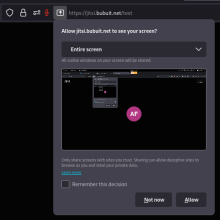
jitsi screencast

  1. jitsi test mit Firefox
  2. Bildschirmauflösung 1920x1080
  3. Splitview MS Mac Gnome
    1. Links Browser
    2. Rechts Terminal
  4. Drittes icon von links im Menü "Start / Stop sharing your screen"
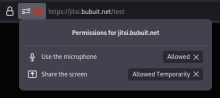
  5. Zugriff auf den Bildschirm erlauben
  6. Status kontrollieren
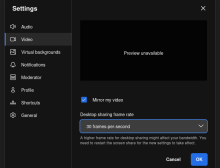
  7. 30 F

fail2ban status script

#!/bin/sh

list=$(fail2ban-client status | grep list | cut -d ":" -f2 | tr -d ',')

for i in $list; do
    fail2ban-client status $i
done

Tags

/etc/rsnapshot_exclude

.Spam/
.Trash/
.cache/yarn/
.cpan/
.cpanm/
.npm/
.oh-my-zsh/

# Mails
USERNAME/Maildir

# Dir 
*-enabled/
alternatives/
cache/
certs/
goaccess/
ipsets/
php/
rc0.d/
rc?.d/
systemd/

# drupal
vendor/
modules/
web/core/
web/themes/
shop/bin/
files/css/
files/js/
files/php/twig/
files/translations/
files/asset_injector/
fonts/
shariff/
core/

# File Type
*.gz
*.lock
*.reason
*.swp
.rnd

Tags

pflogsum

crontab -e

59 23 * * *    /usr/sbin/pflogsumm -d today /var/log/mail.log | mail -s "pflogsum daily Report `date`" log@DOM.TLD
0 1 * * mon    /usr/sbin/pflogsumm /var/log/mail.log.1 | mail -s "pflogsum weekly Report `date`" log@DOM.TLD

nginx peertube proxy

server {
    server_name peertube.TLD;

    access_log    off;
    open_log_file_cache max=1000 inactive=20s valid=1m min_uses=2;

    include /etc/nginx/snippets/letsencrypt-acme-challenge.conf;

ipset

  1. ai firehol-tools
  2. ll -t /etc/firehol/ipsets
  3. update-ipsets enable firehol_level1 firehol_level2 firehol_level3 firehol_level4 fullbogons spamhaus_drop sslbl blocklist_de greensnow ciarmy sslbl_aggressive 
  4. update-ipsets
  5. ipset -L -n
  6. ipset -L firehol_level1
  7. t /var/log/update-ipsets.log
  8. update-ipsets --help
  9. man ipset

/etc/cron.daily/update-ipsets

#!/bin/sh
update-ipsets -s > /var/log/update-ipsets.log 2>&1
 

firehol whitelist

/etc/firehol/whitelist.txt


# myips
YOUR PUBIPS

# hetzner.de
46.4.20.50

# packageist
185.56.232.198

# Mail Server
54.245.105.146
85.214.65.224
151.101.114.217 
176.9.37.124
176.9.78.130
188.40.28.171
195.145.228.186
109.73.15.86

# Top Mailserver
62.146.106.0/24
74.125.200.0/24
80.67.18.0/24
81.169.145.0/24
142.251.31.0/24
194.25.134.0/24
209.85.217.0/24

# google.com
209.85.128.0/24
209.85.214.0/24
209.85.217.0/24
209.85.219.0/24
209.85.220.0/24

Tags

nginx netdata

server {
    server_name    netdata.TLD;

    add_header Strict-Transport-Security "max-age=7200";

mailman

sys

  1. vim /etc/hosts
  2. apt install apache2 php-{bcmath,common,curl,fpm,gd,intl,mbstring,mysql,soap,xml,xsl,zip,cli}
  3. ai mailman3-full postfix
  4. vim /etc/mailman3/mailman.cfg

apache

  1. cp /etc/mailman3/apache.conf /etc/apache2/sites-available/mailman.conf
  2. vim /etc/apache2/sites-available/mailman.conf
  3. a2ensite mailman
  4. a2dissite 000-default.conf

add mail user

adduser USERNAME --shell /usr/sbin/nologin

vim /etc/postfix/virtual
postmap /etc/postfix/virtual

vim /etc/postfix/virtual_domains
postmap /etc/postfix/virtual_domains

postfix reload

IMAP over TLS

mail.DOM.TLD 993
TLS on dedicated port

SMTP over TLS

mail.DOM.TLD 587
TLS on dedicated port

Tags

/etc/opendkim.conf

# Log to syslog
Syslog            yes
SyslogSuccess           Yes
LogWhy                  Yes

# Required to use local socket with MTAs that access the socket as a non-
# privileged user (e.g. Postfix)
UMask            002

Tags

timezone

timedatectl

  • timedatectl set-timezone Europe/Vienna
  • rm /etc/localtime; ln -s /usr/share/zoneinfo/Europe/Vienna /etc/localtime

backup installed packages

backup

  1. dpkg --get-selections > dpkg.txt

restore

  1. dpkg --clear-selections
  2. dpkg --set-selections < dpkg.txt
  3. apt-get autoremove
  4. apt-get dselect-upgrade
     

ipv6 disable

/etc/sysctrl.conf

net.ipv6.conf.all.disable_ipv6 = 1
net.ipv6.conf.default.disable_ipv6 = 1
net.ipv6.conf.lo.disable_ipv6 = 1
net.ipv6.conf.NETWORKINTERFACENAME.disable_ipv6 = 1

sysctl -p

cat /proc/sys/net/ipv6/conf/*/disable_ipv6

/etc/default/grub

GRUB_CMDLINE_LINUX="xxxxx ipv6.disable=1"

update-grub

Tags

owncloud mysql

  1. mysql_secure_installation
  2. mysql -u root -p
  3. create database ocdb;
  4. grant all on ocdb.* to ocadmin@localhost identified by "PASSWD";
  5. flush privileges;
  6. quit

apache owncloud

<VirtualHost *:80>
    DocumentRoot /var/www/owncloud/
    ServerName owncloud.TLD

    <Directory /var/www/owncloud/>
       Options +FollowSymlinks
       AllowOverride All
       Require all granted
         <IfModule mod_dav.c>
           Dav off
         </IfModule>
    </Directory>
</VirtualHost>

ipv4

/etc/network/interfaces

auto enp35s0
iface enp35s0 inet static
 address 116.202.112.180
 netmask 255.255.255.192
 gateway 116.202.112.129
 # route 116.202.112.128/26 via 116.202.112.129
 up route add -net 116.202.112.128 netmask 255.255.255.192 gw 116.202.112.129 dev enp35s0

Tags

logging

  1. ai rsyslog
  2. timedatectl
  3. timedatectl set-timezone Europe/Vienna
Tags

dns Domain

Tags

DDoS protection: SYNPROXY

/etc/firehol/firehol.conf

# SYNPROXY
TRAP_PORTS="25 80"
SUSPECTS_TIMEOUT=3600
TRAP_TIMEOUT=86400
VALID_CONNECTION_COUNT=2
TRAP_ACTION="DROP"

ipv4 synproxy input inface "${wan}" dst "${PUBLIC_IPS}" dport "${TRAP_PORTS}" accept

Zsh-Widget: ALT+#

Mit diesem Code wird die Tastenkombination Alt + # (Esc + #) verwendet, 
um ein Hashtag am Anfang der aktuellen Zeile einzufügen.

insert_hashtag_at_beginning() {
 BUFFER="#$BUFFER"
 CURSOR=$((CURSOR + 1))
 zle redisplay
}

zle -N insert_hashtag_at_beginning
bindkey '\e#' insert_hashtag_at_beginning
 

Tags

bayes

chown debian-spamd:debian-spamd -R /var/lib/spamassassin/bayes/

Tags

apache phpMyAdmin

<VirtualHost *:80>
DocumentRoot    /usr/share/phpmyadmin
ServerName    phpmyadmin.bubuit.net

<Directory /usr/share/phpmyadmin>
   Options SymLinksIfOwnerMatch
   DirectoryIndex index.php

Tags

nginx drupal proxy

server {
    server_name bubuit.net;
#    add_header Strict-Transport-Security "max-age=7200";

    location / {
        proxy_pass http://10.0.3.LXC-IP;
        include proxy_params;
#        proxy_ignore_client_abort on;

nginx icecast proxy

server {
    server_name webradio.TLD;

    add_header Strict-Transport-Security "max-age=7200";

sort

sort | uniq -c  | sort -nr

Tags

awk

skip first column

awk '{$1=""}1'  

print only the last column in a record

awk '{print $NF}'

print first 3 numbers from ip address 
Delimiter "."

awk -F\. '{print $1"."$2"."$3"."}'

Tags

imediff

Tags

alias

-='cd -'

...=../..
....=../../..
.....=../../../..
......=../../../../..
1='cd -1'
2='cd -2'
3='cd -3'
4='cd -4'
5='cd -5'
6='cd -6'
7='cd -7'
8='cd -8'
9='cd -9'
CA='2>&1 | cat -A'

Tags

sa-learn

sa-learn --spam /home/USER/Maildir/.Spam/
sa-learn --ham /home/USER/Maildir/.Sent/

spamassassin --add-addr-to-whitelist=IPADDRESS

Tags