disable remove
ap pyzor
grep -i pyzor /etc/spamassassin/*.cf
/etc/spamassassin/v310.pre:loadplugin Mail::SpamAssassin::Plugin::Pyzor


Tags

Diese Dokumentation beschreibt den vollständigen Aufbau eines virtuellen Mailservers unter Debian 13 (Trixie) mit Postfix, Dovecot, LMTP‑Zustellung, TLS‑Absicherung, Alias‑Management und einem klaren Flat‑Mailstore‑Design. Der Fokus liegt auf Stabilität, Übersichtlichkeit und Erweiterbarkeit.


🔧 1. Pakete installieren (Postfix + Dovecot)

Für einen vollständigen virtuellen Mailserver werden folgende Pakete benötigt:

Tags
  1. ai spamassassin spamd sa-compile spamass-milter re2c pyzor libmail-spamassassin-perl libarchive-zip-perl libidn2-dev libgeo-ip-perl libgeoip-dev perl-doc cpanminus libnet-libidn2-perl libencode-detect-perl libnet-patricia-perl libio-compress-perl libmail-spf-perl libio-socket-inet6-perl libdbi-perl libdbd-sqlite3-perl libwww-perl liblwp-protocol-https-perl libbsd-resource-perl libemail-address-xs-perl libmail-dmarc-perl libdevel-cycle-perl libtext-diff-perl libnet-libidn-perl libmaxmind-db-reader-perl libmaxmind-db-reader-xs-perl libdigest-sha-perl
  2. usermod -a -G spamass-milter

📨 Postfix & SpamAss-Milter Integration Guide

Overview

A complete guide to integrating Postfix with SpamAss-Milter on Debian for effective spam filtering. It covers macro configuration, testing, troubleshooting, and best practices for maintaining clean, reliable mail logs.

Tags
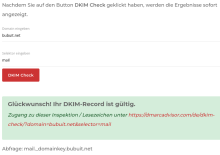
  1. ai opendkim opendkim-tools
  2. mkdir /var/spool/postfix/opendkim/
  3. chown opendkim /var/spool/postfix/opendkim
  4. usermod -aG opendkim postfix
  5. YEAR=$(date +'%Y')
  6. DOMTLD=DOM.TLD
  7. mkdir -p /etc/opendkim/keys/$DOMTLD
  8. cd /etc/opendkim/keys/$DOMTLD
  9. opendkim-genkey -s $YEAR -d $DOMTLD
  10. chown opendkim:opendkim *.private
  11. vim /etc/opendkim.conf

vim /etc/default/opendkim

RUNDIR=/var/spool/postfix/ru
# spamass-milt startup defaults
# OPTIONS are passed directly to spamass-milter.
# man spamass-milter for details
# Non-standard configuration notes:
# See README.Debian if you use the -x option with sendmail
# You should not pass the -d option in OPTIONS; use SOCKET for that.
# Default, use the spamass-milter user as the default user, ignore
# messages from localhost
OPTIONS="-u spamass-milter -i 127.0.0.1"
# Reject emails with spamassassin scores &
Tags

📧 DMARC and SPF Configuration for a Centralized Mail Server

Overview

This guide outlines how to configure SPF and DMARC for multiple domains that all send mail through a single centralized mail servermail.bubuit.net. The goal is to maintain consistent authentication across all domains, simplify future maintenance, and prevent email spoofing.


1. Central Mail Server

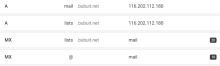
Hostname: mail.bubuit.net
IPv4: 116.202.112.180

Tags

vim scripts/opendkim.sh

#!/bin/bash
# Script Version: 09
# Description: Generate and install OpenDKIM keys for a given domain and append KeyTable + SigningTable entries.

doveadm is the command-line administration tool for Dovecot, used for mailbox management, full-text search, quota checking, and replication tasks.


Syntax

doveadm [global options] <command> [command options]

Example:

doveadm -u user@example.com fetch -A hdr subject

Global Options

Option

Description

-u <user>

Tags

Problemstellung

E-Mails, die von lists.bubuit.net gesendet wurden, wurden von Gmail und anderen Mailservern mit folgendem Fehler abgelehnt:

Tags
#!/bin/bash
# Script Name: sendmail_test.sh
# Version: 03
# Description: This script sends a test email using sendmail. The recipient's email address is the first argument.
#              It logs messages to the console only.

# Check if an argument (email address) is provided
if [ -z "$1" ]; then
    TO="root"
else
    TO="$1"
fi

# Email details
SUBJECT="Postfix Test"
FROM="$(whoami)@$(hostname)"
BODY="This is the email body!"

# Function to send email
send_email() {
    if !

SPF

ai postfix-policyd-spf-python

Create DNS txt record

v=spf1 mx -all

ai postfix postfix-pcre dovecot-core dovecot-imapd sasl2-bin libsasl2-modules

Tags
namespace inbox {
 # These mailboxes are widely used and could perhaps be created automatically:
 mailbox Drafts {
    auto = subscribe
   special_use = \Drafts
 }
 mailbox Important {
    auto = subscribe
   special_use = \Important 
 }
 mailbox Archive {
    auto = subscribe
   special_use = \Archive
 }
 mailbox Junk {
    auto = subscribe
   special_use = \Junk
 }
 mailbox Trash {
    auto = subscribe
   special_use = \Trash
 }
 # For \Sent mailboxes there are two widely used nam
Tags

/var/www/srvip/mail/config-v1.1.xml

<?xml version="1.0" encoding="UTF-8"?>

crontab -e

59 23 * * *    /usr/sbin/pflogsumm -d today /var/log/mail.log | mail -s "pflogsum daily Report `date`" log@DOM.TLD
0 1 * * mon    /usr/sbin/pflogsumm /var/log/mail.log.1 | mail -s "pflogsum weekly Report `date`" log@DOM.TLD

sys

  1. vim /etc/hosts
  2. apt install apache2 php-{bcmath,common,curl,fpm,gd,intl,mbstring,mysql,soap,xml,xsl,zip,cli}
  3. ai mailman3-full postfix
  4. vim /etc/mailman3/mailman.cfg

apache

  1. cp /etc/mailman3/apache.conf /etc/apache2/sites-available/mailman.conf
  2. vim /etc/apache2/sites-available/mailman.conf
  3. a2ensite mailman
  4. a2dissite 000-default.conf

adduser USERNAME --shell /usr/sbin/nologin

vim /etc/postfix/virtual
postmap /etc/postfix/virtual

vim /etc/postfix/virtual_domains
postmap /etc/postfix/virtual_domains

postfix reload

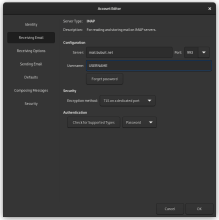
IMAP over TLS

mail.DOM.TLD 993
TLS on dedicated port

SMTP over TLS

mail.DOM.TLD 587
TLS on dedicated port

# Log to syslog
Syslog            yes
SyslogSuccess           Yes
LogWhy                  Yes

# Required to use local socket with MTAs that access the socket as a non-
# privileged user (e.g. Postfix)
UMask            002

Tags